

2026 Chevrolet Traverse: Family-Friendly Tech Features You Didn’t Know About
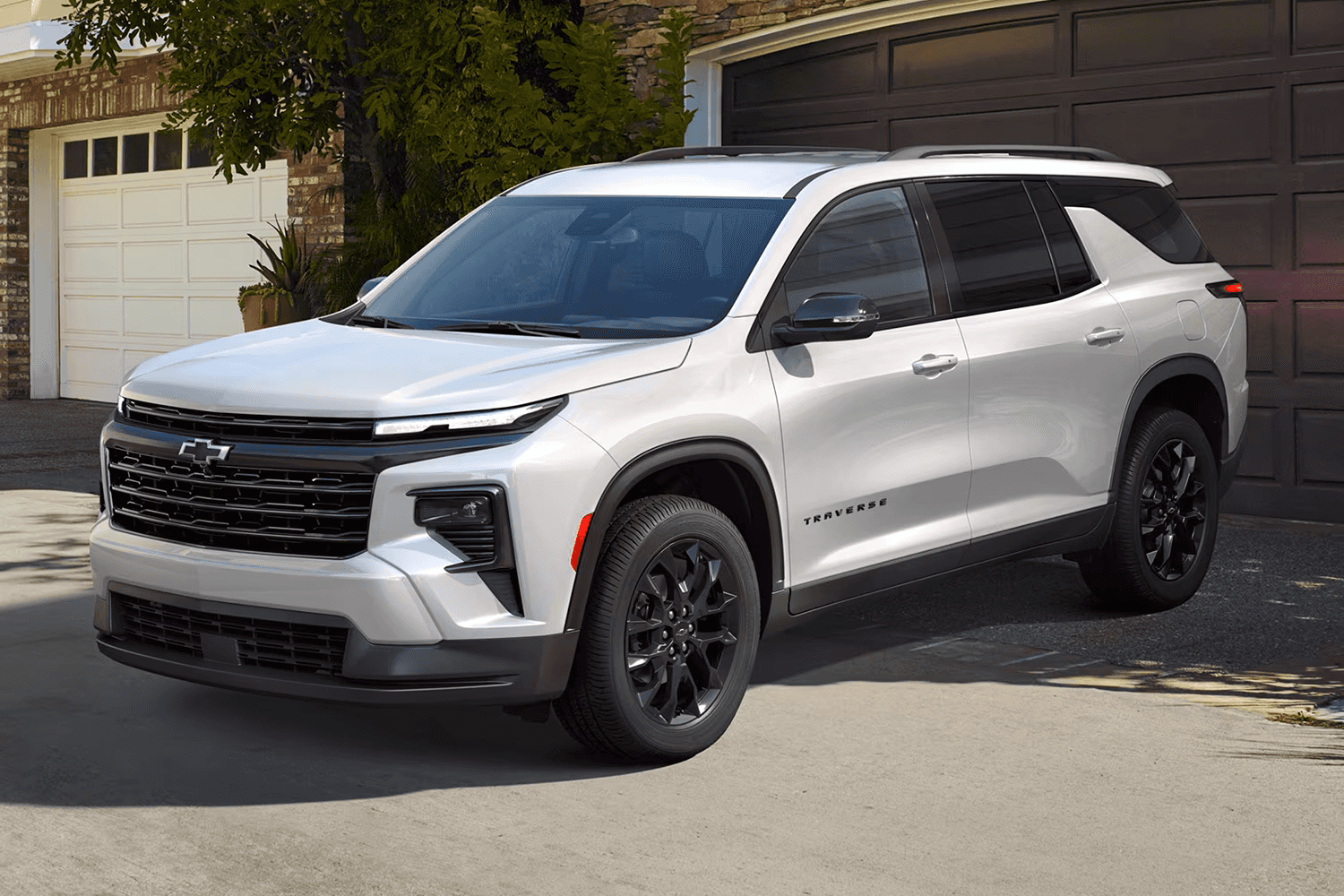
The 2026 Chevrolet Traverse is a three-row family SUV that combines advanced safety systems, modern connectivity, and comfortable packaging to solve common pain points for multi-passenger households. This article reveals lesser-known tech features—like Super Cruise hands-free driving, the 17.7-inch infotainment command center, and Teen Driver parental controls—and explains how each one produces tangible benefits for daily school runs, long highway trips, and busy suburban life. Families often struggle with distracted driving, device management, and keeping rear-seat passengers entertained while maintaining safety; the Traverse’s integrated driver-assist suite, Google built-in functionality, and onboard Wi-Fi hotspot address those problems directly. Below you’ll find clear explanations, real-world scenarios, configuration tips, and local next steps including how Webb Chevrolet Oak Lawn can help arrange a test drive or financing conversation. If you want to experience the Traverse’s tech in person, schedule a test drive to see Super Cruise and the 17.7-inch touchscreen in action with a dealership specialist at Webb Chevrolet Oak Lawn.
What Are the Key Family Safety Technologies in the 2026 Chevrolet Traverse?

The Traverse bundles a suite of driver-assistance systems—collectively referenced as Chevy Safety Assist—plus advanced cameras and optional Super Cruise to reduce collision risk and driver workload during multi-stop family days. These systems work together by detecting hazards, warning the driver, and intervening when necessary, which lowers the chance of front and side impacts during school drop-offs or highway commutes. For families, the combined effect is less stress behind the wheel, clearer decision-making at intersections, and improved protection for all occupants. The following list highlights the core safety technologies parents should know about and how each one matters in everyday scenarios.
- Automatic Emergency Braking (AEB): Detects imminent frontal collisions and applies brakes to reduce severity or prevent impact.
- Lane Keep Assist with Lane Departure Warning: Alerts the driver and gently steers to keep the vehicle centered during long drives.
- Blind Zone Steering Assist / Blind-Spot Monitoring: Warns about vehicles in adjacent lanes and can apply corrective steering to avoid side collisions.
- Surround Vision Camera: Provides a top-down view for tight parking and maneuvering around school zones and crowded lots.
These features are most effective when used together, creating a layered defense that addresses both driver error and external hazards. Understanding how each component contributes to a comprehensive safety posture helps families choose the right trim and optional packages for their driving patterns.
How Does Chevy Safety Assist Protect Your Family on Every Drive?
Chevy Safety Assist is a collection of sensor-driven features—such as forward collision alert, AEB, and lane-keeping technologies—that monitor the vehicle’s environment and act to prevent or lessen crashes. The system pairs radar and camera inputs to determine threats, then issues warnings and, when necessary, automatically brakes or provides steering support to maintain safe lanes. For families, this means that routine situations like distracted braking in traffic or an unseen vehicle in a blind spot become less dangerous because the system provides an additional layer of reaction time. Drivers should view these features as a safety net that complements, rather than replaces, active attention and safe driving practices.
This automated assistance leads naturally to one of the Traverse’s headline features: Super Cruise hands-free driving on compatible roads, which extends driver relief on long trips while preserving safety oversight.
Traffic Safety Enhanced by Driver Assistance and Intelligence: A Comprehensive Review
Future mobility must maintain current safety levels and strive for further improvement. This paper reviews research on driver behavior and assesses progress in driver assistance and intelligence systems. Key areas covered include the vehicle’s longitudinal and transversal dynamics, driver behavior at intersections, safety-oriented approaching behavior, a driving dependability model for identifying traffic accident causes, and methods for analyzing whether every error leads to a traffic accident. Notably, this paper details the technical advancements in driver assistance systems from manufacturers such as BMW, Daimler, Audi, Citroen, Lexus, VW, Opel, Peugeot, Renault, Chevrolet, Saab, and suppliers like Bosch. Both research contributions in driving behavior analysis and driver assistance systems require continuous alignment with an updated interaction among the driver, vehicle, and road traffic environment. Traffic safety through driver assistance and intelligence, 2011
What Is Super Cruise and How Does It Enhance Hands-Free Driving?
Super Cruise is a hands-free driving technology designed for compatible divided highways and major routes, allowing the driver to remove hands from the wheel while the system manages steering, acceleration, and braking under supervision. It uses precise lane-mapping data, camera-based road detection, and driver monitoring to ensure the driver stays engaged; if supervision lapses, the system prompts the driver to retake control. For families on long interstate drives to relatives or vacation destinations, Super Cruise reduces fatigue and improves comfort without eliminating the need for driver attention. While not a substitute for an attentive driver, Super Cruise can make extended highway segments less taxing, allowing parents to arrive more alert and ready to tend to kids and responsibilities.
These safety systems together create peace of mind for family travel and naturally lead into the Traverse’s infotainment features that keep everyone connected and entertained.
How Does the 2026 Traverse Infotainment System Keep Families Connected?
The Traverse’s infotainment architecture centers on a 17.7-inch diagonal touchscreen and integrated Google built-in functionality, which centralize navigation, media, and voice controls to reduce driver distraction and streamline family coordination. The touchscreen’s size and layout make map glanceability and touch targets easier for the driver, while the software arrangement supports voice-first interactions for route changes or music selection. For families, that translates into fewer fiddly interactions with phones and cleaner handoffs when navigating unfamiliar suburbs or planning stops. Below is a concise comparison of the key connectivity options and what they enable for everyday family use.
Connectivity options and practical family use:
| Connectivity Option | Type | Practical Use on Family Trips |
|---|---|---|
| Google built-in | Native Android/Google services | Voice navigation to rest stops, local search for kid-friendly restaurants, hands-free route changes |
| Wireless Apple CarPlay / Android Auto | Phone projection | Familiar app access for media and messaging without cords, keeps individual playlists available |
| Onboard Wi-Fi Hotspot | Cellular-based internet | Multiple devices can stream or connect for remote homework, video calls, or navigation updates |
| USB-C charging ports | High-power charging | Fast charging for tablets and gaming devices to keep rear passengers occupied |
This table demonstrates how each connectivity option fills a specific role, letting parents choose the balance of native services and phone-based projection that suits their household’s tech habits.
What Makes the 17.7-inch Touchscreen the Family’s Command Center?
The 17.7-inch touchscreen functions as the primary human-machine interface, grouping navigation, media, and vehicle settings into a large, readable display that reduces time spent searching menus while driving. Larger touch targets and customizable home screens let drivers place commonly used functions—like navigation and phone—front and center, which is particularly helpful during dynamic family trips where stops and detours are frequent. The screen also supports split views or quick toggles so a parent can manage navigation while a passenger selects audio, minimizing driver distraction. Because the interface integrates with Google built-in and wireless phone projection, it consolidates different ecosystems in one visible command center for smoother in-vehicle coordination.
These usability advantages set the stage for how Google built-in contributes beyond basic maps and into active trip management for families.
How Does Google Built-in Integration Improve Family Road Trips?
Google built-in brings Google Maps, Assistant, and Play directly into the vehicle software, enabling true voice-first navigation and local search without depending on phone mirroring. Families benefit from quick voice queries—such as “find the closest rest stop with a playground”—and from Assistant routines that manage navigation and incoming message narration while keeping eyes on the road. The integration also supports native app experiences that reduce the need to switch between phone and vehicle UI, improving safety and convenience. In real-world terms, parents can ask for nearby kid-friendly attractions, get estimated arrival times that account for traffic, and request turn-by-turn updates without taking hands off the wheel.
After seeing infotainment in action, many families prefer professional setup assistance; Webb Chevrolet Oak Lawn offers in-dealership demos and infotainment walkthroughs to configure Google accounts, Wi-Fi hotspot setup, and user profiles for each family member. Service staff can schedule a setup appointment or a guided test drive to demonstrate these features live with your household’s devices.
How Does Teen Driver Technology in the 2026 Traverse Provide Peace of Mind?
Teen Driver technology is designed to help parents coach new drivers by providing configurable restrictions, audible warnings, and driving reports that summarize behavior after each trip. The system can mute certain audio features, issue speed alerts, and create a report card that highlights instances of hard braking, speeding, or other risky behaviors. For families, this creates an evidence-based approach to conversations about safe driving and allows parents to gradually expand privileges as driving maturity grows. The following numbered list outlines core Teen Driver capabilities and how parents can use them to set expectations.
- Speed alerts and audio limits: Reduce distractions and remind novice drivers to adhere to agreed speed thresholds.
- Report generation: Provides a post-trip summary of unsafe events to foster discrete coaching conversations with data.
- Mute or limit entertainment: Automatically restricts certain audio features until safe driving criteria are met.
These features give parents clear, actionable feedback and a framework for rewarding safer driving habits, turning judgment calls into data-supported guidance that helps build long-term responsibility.
What Features Does Teen Driver Technology Offer for Responsible Driving?
Teen Driver aggregates multiple controls—speed warnings, audio muting, and summary reports—into a parental toolkit that tracks driving patterns without constant supervision. The system timestamps events like rapid acceleration and hard braking, which allows parents to pinpoint situations that require training or rule-setting. By quantifying risk, Teen Driver shifts conversations from subjective criticism to constructive coaching supported by records of actual trips. This approach typically makes follow-up discussions more productive, because both parent and teen can see specific behaviors to improve rather than arguing about vague impressions.
Parents who use Teen Driver regularly tend to report clearer progress and more measurable behavior change, which encourages ongoing use and makes the system a practical part of earning driving privileges.
How Can Parents Use Teen Driver to Promote Safer Habits?
A recommended parent workflow is to enable Teen Driver, set conservative speed and audio thresholds, review the driving report after the first several trips, and provide targeted feedback focused on one or two improvement goals. Start with short supervised drives to calibrate expectations, then use report summaries as neutral evidence during coaching conversations. Parents should set staged incentives: for example, reduce restrictions after a month of cleaner reports or approve longer solo trips once risk metrics fall below agreed limits. With consistent use, Teen Driver creates a feedback loop that emphasizes incremental improvement rather than punitive measures.
This behavior-focused strategy complements the Traverse’s safety hardware and broader comfort features that make family travel less stressful.
What Comfort and Convenience Features Make the 2026 Traverse Ideal for Families?
Beyond safety and connectivity, the Traverse offers seating flexibility, cargo management, and cabin features such as active noise cancellation that improve comfort on short errands and long vacations. Power-folding second- and third-row seats allow rapid conversion from passenger transport to cargo hauling, while cabin acoustic treatments and noise reduction tech preserve conversation and rest for rear passengers. Practical convenience items like multiple USB-C ports and an available hands-free liftgate speed loading and charging for busy families.
Notable comfort and convenience features:
- Power-folding second/third-row seats: Convert seating arrangement quickly for strollers, sports gear, or groceries.
- Active Noise Cancellation (ANC): Reduces highway hum and improves in-car conversation and media clarity.
- Multiple USB-C ports and wireless charging: Keep devices powered for entertainment and navigation.
- AutoSense Power Liftgate: Simplifies loading when hands are full with kids or shopping.
These amenities reduce everyday friction and help families focus on the journey instead of logistics, while ANC specifically improves rest opportunities for sleeping children on longer drives.
How Do Power-Folding Seats and Flexible Seating Enhance Family Adventures?
Power-folding seats let parents reconfigure the Traverse quickly between seven-passenger mode and large-cargo mode, which is especially useful when switching from weekend team soccer to grocery trips the next day. The mechanism is designed to be intuitive—often operable with switches or remote inputs—so a single adult can transform the cabin in seconds without wrestling heavy seatbacks. Flexible seating arrangements mean more options for pet carriers, car seats, and luggage, enabling families to optimize comfort without sacrificing cargo space. Because the system reduces setup time, families spend less time prepping vehicles and more time on actual activities.
This flexibility is complemented by cabin features that preserve a calm interior environment for all occupants.
What Role Does Active Noise Cancellation Play in a Serene Family Ride?
Active Noise Cancellation works by using cabin microphones and speakers to counteract low-frequency sounds—like road and wind noise—improving the clarity of conversations and audio playback in the car. For sleeping children or back-seat homework sessions, ANC can create a quieter environment that reduces fatigue and increases comfort. By lowering ambient noise, ANC also helps reduce the volume drivers need to set for navigation or entertainment, which can indirectly decrease driver distraction. In combination with comfortable seating and climate controls, ANC contributes to a more restful and controlled cabin environment for family travel.
A calm interior makes it easier to use infotainment and connectivity features responsibly, leading naturally to the next section about the Traverse’s connectivity suite.
Why Is the 2026 Traverse’s Connectivity Suite Essential for Modern Families?
Modern families rely on continuous connectivity for navigation, streaming, and staying in touch, and the Traverse’s suite—comprising onboard Wi-Fi, wireless Apple CarPlay and Android Auto, USB-C ports, and Google built-in—addresses these needs with a mix of native and phone-projection options. Onboard Wi-Fi centralizes internet access so multiple devices can remain online simultaneously, which is useful for remote learning or keeping multiple passengers entertained during longer trips. Wireless projection reduces cable clutter and helps drivers access familiar apps safely, while USB-C ports provide faster charging for today’s power-hungry tablets and laptops. Below is a compact comparison table showing how each connectivity solution maps to practical family scenarios.
Connectivity options comparison:
| Option | Connectivity Type | Practical Family Benefit |
|---|---|---|
| Onboard Wi-Fi hotspot | Cellular-based vehicle internet | Multiple devices stream or connect concurrently for entertainment and remote work |
| Wireless Apple CarPlay / Android Auto | Phone projection over Wi-Fi/Bluetooth | Access favorite apps and messages without cables, simplifying device switching |
| Google built-in | Native vehicle apps and Assistant | Voice-first search and navigation without depending on a phone, good for local queries |
| USB-C ports | High-speed wired charging | Fast power delivery to tablets and gaming devices for rear-seat passengers |
This table clarifies which solution to rely on for streaming, mapping, or powering devices during family travel and underscores the importance of combining native capabilities with phone-based options.
How Does the Onboard Wi-Fi Hotspot Keep Everyone Connected on the Go?
An onboard Wi-Fi hotspot turns the vehicle into a mobile router that supports multiple passengers and devices, enabling streaming, video calls, and constant map updates without draining individual phone plans. For families, the hotspot allows kids to stream videos on tablets during long drives, parents to handle navigation updates or remote work, and devices to stay synchronized while on the move. Hotspot service typically requires a data subscription, so families should assess plan options with their mobile provider to avoid unexpected costs. Properly managed, the hotspot minimizes phone tethering and keeps essential services running smoothly for the whole household.
With connectivity set up, wireless projection and USB-C charging ensure devices remain usable and organized for every passenger.
What Are the Benefits of Wireless Apple CarPlay, Android Auto, and USB-C Ports?
Wireless Apple CarPlay and Android Auto let occupants access phone-based apps and messages without plugging in, reducing cable clutter and enabling quick device handoffs between drivers and passengers. USB-C ports supply higher-power charging suitable for modern tablets and laptops, keeping entertainment devices ready for long trips and reducing interruptions. Together, these options lower friction for using navigation and media, which improves safety by reducing the need for handling phones while driving. Families benefit from a flexible, device-friendly ecosystem that supports multiple user preferences and avoids the chaos of tangled cords in the cabin.
These connectivity strengths tie back to in-dealership support and practical next steps for families considering the Traverse.
How Does Webb Chevrolet Oak Lawn Support Families Buying the 2026 Traverse?
Webb Chevrolet Oak Lawn offers local support tailored to families who want to buy, finance, and maintain a 2026 Traverse while preserving the vehicle’s advanced tech and safety features. The dealership provides access to new and used Chevrolet vehicles, parts and service department support, and financing options to help structure payments that fit household budgets. For families, this means a single local partner that can arrange a test drive, help pre-qualify for financing, and schedule service appointments to keep safety systems and infotainment up to date. The table below summarizes key dealership services and how each one helps Oak Lawn-area families make the most of the Traverse.
Local dealership services for families:
| Offer / Service | What It Includes | How It Helps Local Families |
|---|---|---|
| Test drives / inventory access | In-person demo and immediate vehicle availability | Experience Super Cruise and infotainment firsthand before purchase |
| Financing assistance | Local finance guidance and application support | Structure monthly payments to fit family budgets and clarify options |
| Certified service & parts | Trained technicians and OEM parts | Preserve safety systems and perform software/config updates for infotainment |
| Service scheduling | Online or phone-based appointments | Convenient maintenance that minimizes disruption to family routines |
What Financing Options Make the 2026 Traverse Affordable for Oak Lawn Families?
Financing at Webb Chevrolet Oak Lawn includes guidance through standard auto financing paths, local application assistance, and payment planning to help families align monthly costs with their budgets. Dealership finance staff can explain options, help complete pre-qualification steps, and run payment scenarios so families understand trade-offs between term length, down payment, and monthly obligations. Using these services helps families move from research to ownership with transparent financial planning and avoids last-minute surprises. A brief consultation at the dealership can clarify next steps for pre-approval and contract structure.
Effectiveness of Advanced Driver Assistance Systems (ADAS) in Crash Prevention
ABSTRACT: This retrospective cohort study employs survival analysis to estimate the effectiveness of Toyota’s Advanced Driver Assistance Systems (ADAS) in preventing system-relevant crashes. Toyota production data were integrated with police-reported crash files from eight U.S. states for crash years 2015 through 2019, matched by 17-digit Vehicle Identification Number (VIN). System-relevant crash scenarios encompassed: rear-end collisions, single-vehicle run-off-the-road events, same-direction sideswipe incidents, head-on collisions, and pedestrian impacts. The study vehicle cohort comprised 11 Toyota/Lexus models, model years 2015 through 2018, sold within the eight study states. The ADAS technologies investigated included automatic emergency braking (AEB), lane departure warning (LDW), lane keeping assistance (LKA), blind spot monitoring (BSM), and pedestrian automatic emergency braking (PedAEB). Among the study cohort of 2,394,913 vehicles, 308,490 crashes were reported by police. The crude crash rate ratio (CRR) was 0.61 for AEB-equipped vehicles compared to non-equipped vehicles. However, the CR Effectiveness of advanced driver assistance systems in preventing system-relevant crashes, 2021
How Can Families Schedule Service and Maintenance for Their Traverse?
Families can schedule service appointments with Webb Chevrolet Oak Lawn’s parts and service department to maintain safety features and apply software updates that preserve Super Cruise, infotainment compatibility, and sensors. Dealer-certified technicians use OEM parts and follow manufacturer-recommended maintenance schedules to keep driver-assistance calibrations accurate and cabin systems functioning. Regular service visits also provide opportunities for infotainment walkthroughs and connectivity setup, so families leave confident that their Google built-in, Wi-Fi hotspot, and phone projection are configured correctly. Booking service reduces long-term ownership friction and helps ensure that the Traverse’s advanced systems continue to protect and entertain your family.
If you’re ready to experience the Traverse’s family-friendly tech, schedule a test drive or finance consultation with Webb Chevrolet Oak Lawn to see these systems firsthand and discuss payment options that work for your household.

0 comment(s) so far on 2026 Chevrolet Traverse: Family-Friendly Tech Features You Didn’t Know About